(Solution) Avado New 50S02 Task Two: Develop and Deliver Digital Learning Content
Solution
Outline
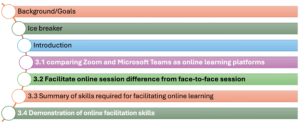
Background/Goals
Good morning everyone, thanks so much for taking time out of your busy schedules to join our session today. As many of you know, when the pandemic hit we had to move some of our volunteer training sessions online. While this helped us continue providing support remotely, I think it’s fair to say the virtual sessions didn’t quite have the same impact.
A few of you expressed to me that you felt less confident facilitating over Zoom compared to in-person. You were looking for some new tools and techniques to really engage participants through a computer screen. At the same time, our volunteers deserve the highest quality experience whether training is virtual or in-person. Hosting options virtually also opens up access for more people with busy lives.
That’s why I’ve put together this workshop for you all today. As you may know, developing interactive online content and facilitating remote sessions is my area of expertise. Our goal is to provide an overview of best practices for guiding sessions online. I’ll be demonstrating some ways to make presentations more visually appealing and introduce more collaboration. It’s my hope that after we go through some examples, you’ll walk away feeling confident about activities and discussions virtually. You’ll also gain skills to enhance volunteers’ learning from a distance.
Please let me know if you have any other questions as we get started. I’m looking forward to working with you all!

Welcome everyone! Before we get started, I thought it would be fun to do a lighthearted icebreaker relating to our topic of online facilitation.
I’ll ask you all to respond using the chat function with your answer to the following:
What is one online facilitation tool that you have used recently (for work, learning, recreation) and how did it go? Was it successful in engaging people or did you encounter any issues using it?
Some examples could be:
Using breakout rooms in a Zoom meeting – it went well
Facilitating a virtual workshop on Teams – had some trouble with screensharing
Taking an online class that used embedded videos – really helped explain concepts
I’ll give you all a couple minutes to jot down your response in the chat. Don’t overthink it, just share one recent experience that comes to mind.
(Allow time for responses)
Great, thanks for sharing everyone! It’s interesting to hear the variety of tools being used and both the positives as well as pain points people have experienced. I hope these experiences will help provide a springboard for our discussion today on best practices. Feel free to reference your answer later if you have any other questions come up.
Without further ado, let’s jump into our first topic…(begin presentation).
The aim of this icebreaker is to get people actively participating from the start in a low-pressure way connected to the session content, while also identifying participants’ existing knowledge bases.


Please click the Download icon to access this assessment in full